

PowerShell経由で「真のWebView2」を召喚する
ちゃんとしたWebView2じゃないと嫌だ?
そんな欲望なあなたにちょっと高度な制御になるか、そこまで難しくない方法を伝授しよう。
Edge埋め込みのフォーカス問題を解決し、なおかつ本物の WebView2 を呼び出す方式です。
外部SDKのインストールを一切行わず、Windowsに標準搭載されているリソースのみで「真のWebView2」を起動します。
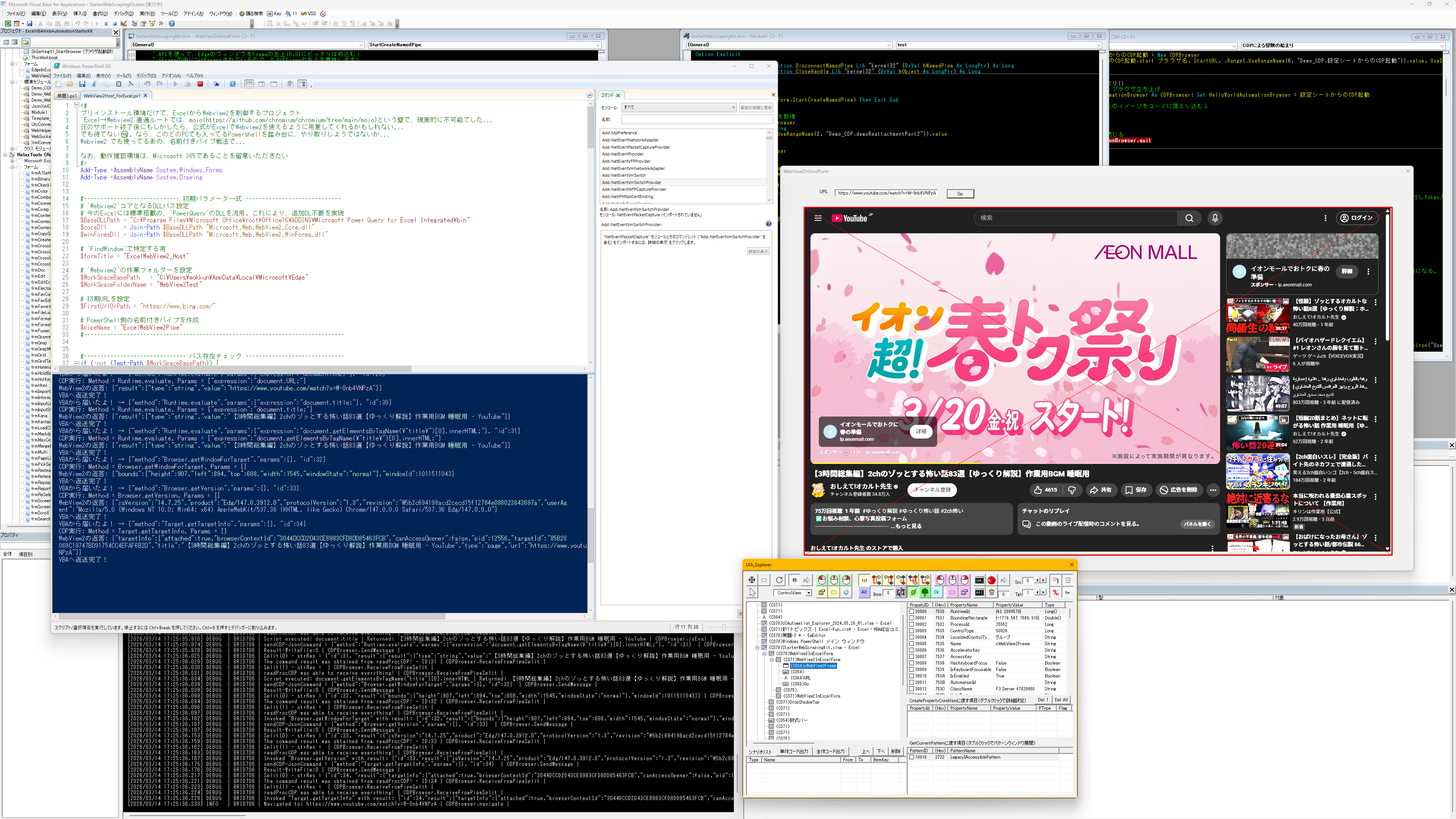
▲ 真のWebView2が起動されている様子。プロセスもPowerShell配下にぶら下がります
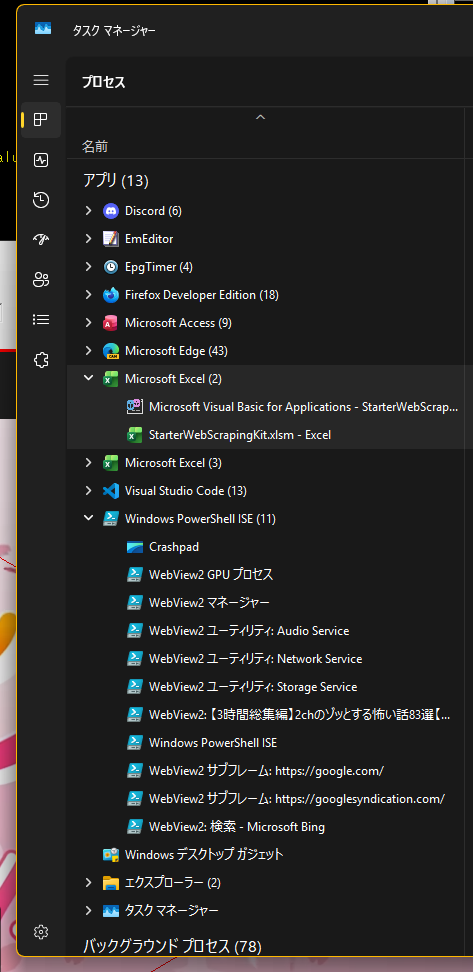
本来、WebView2を自作アプリに組み込むには、Microsoftが配布している WebView2Loader.dll などのSDKが必要です。「追加DL禁止の縛りでは不可能では?」と思うかもしれません。
しかし、Excelのインストールフォルダの深淵で**「奇跡」**を発見しました。
奇跡の発見:Power Queryのアドインフォルダ
今のExcelに標準搭載されている「Power Query」のフォルダ内に、WebView2のコアDLLがひっそりと同梱されていたのです。
これを使えば、追加DL不要の「プリインストール縛り」を完全にクリアできます。
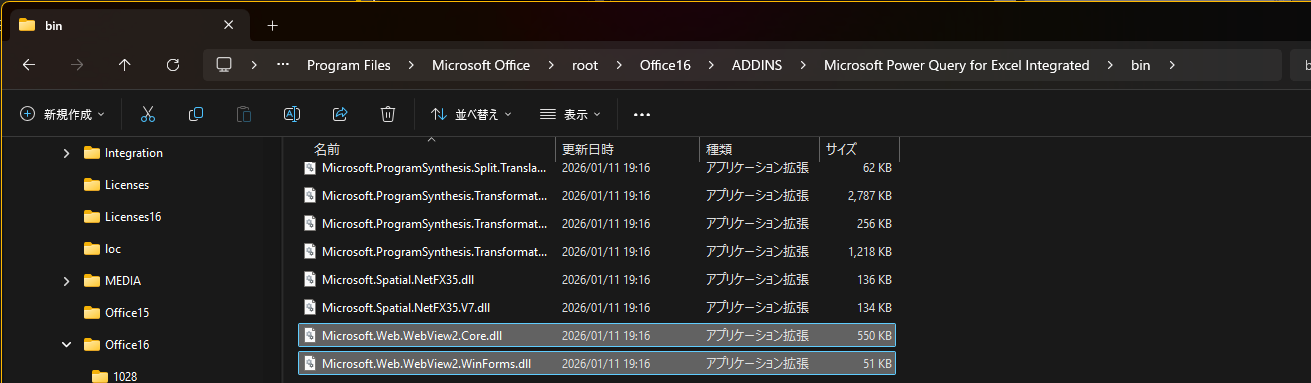
場所
C:\Program Files\Microsoft Office\root\Office16\ADDINS\Microsoft Power Query for Excel Integrated\bin
Microsoft.Web.WebView2.Core.dllMicrosoft.Web.WebView2.WinForms.dll
構成と処理の流れ
VBAから直接このDLLを叩くのは言語仕様上の制約が多いため、どのWindows PCにも標準搭載されている PowerShell を中継(プロキシ)として利用します。
Excel ↔ Named Pipe ↔ PowerShell ↔ WebView2 API- PowerShellでDLLをロード: スクリプト内でPower QueryのDLLを読み込み、WinForms上でWebView2コントロールを描画。
- 名前付きパイプによるプロセス間通信: VBA側で「名前付きパイプ(Named Pipe)」サーバーを開設し、PowerShellがそこに接続。
- CDPの直結トンネルを開通: VBAからパイプ経由でCDPコマンドを送信。PowerShellがそれを受け取り、WebView2の低レベルメソッド
CallDevToolsProtocolMethodAsyncにそのまま横流しします。
WebView2の内部には「Mojo」と呼ばれる難解なC++バイナリ通信プロトコルの壁が存在しますが、この構成なら、PowerShellと既存のDLLがその壁を完全に隠蔽してくれます。
PowerShell側の実装例
PowerShell実装例:DLLロードと名前付きパイプ通信のスクリプト
Add-Type -AssemblyName System.Windows.Forms
Add-Type -AssemblyName System.Drawing


#----------------------------- 初期パラメータ一式 -----------------------------
# `Webview2`コアとなるDLLパス設定
# 今のExcelには標準搭載の、`PowerQuery`のDLLを流用。これにより、追加DL不要を実現
$BaseDLLPath = "C:\Program Files\Microsoft Office\root\Office16\ADDINS\Microsoft Power Query for Excel Integrated\bin"
$coreDll     = Join-Path $BaseDLLPath "Microsoft.Web.WebView2.Core.dll"
$winFormsDll = Join-Path $BaseDLLPath "Microsoft.Web.WebView2.WinForms.dll"

# `FindWindow`で特定する用
$formTitle = "ExcelWebView2_Host"

# `Webview2`の作業フォルダーを設定
$WorkSpaceBasePath   = "C:\Users\XXXX\AppData\Local\Microsoft\Edge"
$WorkSpaceFolderName = "WebView2Test"

# 起動引数設定
$AddStartArg = ""

# 初期URLを設定
$FirstUrlOrPath = "https://www.bing.com/"

# PowerShell側の名前付きパイプを作成
$pipeName = "LOCAL\ExcelWebView2Pipe"
#-------------------------------------------------------------------------------


#------------------------------- パス存在チェック ------------------------------
if (-not (Test-Path $WorkSpaceBasePath)) {
    [System.Windows.Forms.MessageBox]::Show("Folder not found:`n$WorkSpaceBasePath", "WebView2 Host", [System.Windows.Forms.MessageBoxButtons]::OK, [System.Windows.Forms.MessageBoxIcon]::Error)
    exit 1
}

if (-not (Test-Path $coreDll) -or -not (Test-Path $winFormsDll)) {
    [System.Windows.Forms.MessageBox]::Show("DLL files missing in folder:`n$BaseDLLPath`n`nCore: $(Test-Path $coreDll)`nWinForms: $(Test-Path $winFormsDll)", "WebView2 Host", [System.Windows.Forms.MessageBoxButtons]::OK, [System.Windows.Forms.MessageBoxIcon]::Error)
    exit 1
}
#-------------------------------------------------------------------------------


#------------------------------- DLL読み込みcheck ------------------------------
try {
    Add-Type -Path $coreDll
    Add-Type -Path $winFormsDll
} catch {
    [System.Windows.Forms.MessageBox]::Show("Failed to load DLL.`n$BaseDLLPath`n`nError: $($_.Exception.Message)", "WebView2 Host", [System.Windows.Forms.MessageBoxButtons]::OK, [System.Windows.Forms.MessageBoxIcon]::Error)
    exit 1
}
#-------------------------------------------------------------------------------


#------------------------Excelへの名前付きパイプ接続処理------------------------
try {
    $pipeClient = [System.IO.Pipes.NamedPipeClientStream]::new(".", $pipeName, [System.IO.Pipes.PipeDirection]::InOut)
    Write-Host "VBAからの接続を待っています... 10秒以内に接続して下さい。"
    $pipeClient.Connect(10000)

    $reader = [System.IO.StreamReader]::new($pipeClient)
    $writer = [System.IO.StreamWriter]::new($pipeClient)
    $writer.AutoFlush = $true

    Write-Host "VBAサーバーへの接続完了!コマンド待機中..."
} catch {
    Write-Error "時間内でのExcelからの接続が、確認できませんでした。`n$($_.Exception.Message)"
    exit 1
}
#-------------------------------------------------------------------------------


#-------------------------------Form作成処理------------------------------------
$form = New-Object System.Windows.Forms.Form
$form.Text = $formTitle
$form.FormBorderStyle = 'None'
$form.ShowInTaskbar = $false
$form.StartPosition = 'Manual'
$wv2 = New-Object Microsoft.Web.WebView2.WinForms.WebView2
$wv2.Dock = [System.Windows.Forms.DockStyle]::Fill
$form.Controls.Add($wv2)
$form.Show()
#-------------------------------------------------------------------------------


#----------------------------WebView2起動処理-----------------------------------
$options = [Microsoft.Web.WebView2.Core.CoreWebView2EnvironmentOptions]::new($AddStartArg)

$userDataFolder = Join-Path $WorkSpaceBasePath $WorkSpaceFolderName
if (-not (Test-Path $userDataFolder)) { New-Item -ItemType Directory -Path $userDataFolder -Force | Out-Null }

$envTask = [Microsoft.Web.WebView2.Core.CoreWebView2Environment]::CreateAsync($null, $userDataFolder, $options)
while (-not $envTask.IsCompleted) { [System.Windows.Forms.Application]::DoEvents(); Start-Sleep -Milliseconds 50 }
$wv2Env = $envTask.Result
$initTask = $wv2.EnsureCoreWebView2Async($wv2Env)
while (-not $initTask.IsCompleted) { [System.Windows.Forms.Application]::DoEvents(); Start-Sleep -Milliseconds 50 }

if ($FirstUrlOrPath -match "^https?://") { $wv2.Source = [System.Uri]::new($FirstUrlOrPath) }
elseif (Test-Path $FirstUrlOrPath -PathType Leaf) { $wv2.Source = [System.Uri]::new((Resolve-Path $FirstUrlOrPath).Path) }
else { $wv2.Source = [System.Uri]::new("about:blank") }
#-------------------------------------------------------------------------------


#-----------------------------Excelとのやりとり---------------------------------
$buffer = New-Object byte[] 1024
$readTask = $pipeClient.ReadAsync($buffer, 0, $buffer.Length)

while ($form.Visible -and $pipeClient.IsConnected) {
    [System.Windows.Forms.Application]::DoEvents()

    if ($readTask.IsCompleted) {
        $bytesRead = $readTask.Result

        if ($bytesRead -gt 0) {
            $jsonStr = [System.Text.Encoding]::UTF8.GetString($buffer, 0, $bytesRead)
            Write-Host "VBAから届いたよ! → $jsonStr"

            $cleanJson = $jsonStr.TrimEnd([char]0).Trim()
            $cmd = $cleanJson | ConvertFrom-Json

            $paramsJson = "{}"
            if ($null -ne $cmd.params) {
                $paramsJson = $cmd.params | ConvertTo-Json -Compress -Depth 10
            }

            Write-Host "CDP実行: Method = $($cmd.method), Params = $paramsJson"

            $cdpTask = $wv2.CoreWebView2.CallDevToolsProtocolMethodAsync($cmd.method, $paramsJson)

            while (-not $cdpTask.IsCompleted) {
                [System.Windows.Forms.Application]::DoEvents()
                Start-Sleep -Milliseconds 10
            }

            $cdpResult = $cdpTask.Result
            Write-Host "WebView2の返答: $cdpResult"

            if ([string]::IsNullOrWhiteSpace($cdpResult)) {
                $cdpResult = "{}"
            }

            $responseJson = "{`"id`":$($cmd.id), `"result`":$cdpResult}" + [char]0
            $responseBytes = [System.Text.Encoding]::UTF8.GetBytes($responseJson)

            $pipeClient.Write($responseBytes, 0, $responseBytes.Length)
            $pipeClient.Flush()
            Write-Host "VBAへ返送完了!"

            $readTask = $pipeClient.ReadAsync($buffer, 0, $buffer.Length)
        }
        else {
            Write-Host "パイプが切断されました(0バイト受信)"
            break
        }
    }

    Start-Sleep -Milliseconds 20
}
デメリット
セキュリティソフトの誤検知リスク:
VBAからPowerShellを起動し、プロセス間通信を行う挙動は、EDR等のセキュリティソフトに「悪意のある挙動」として検知される可能性があります。環境によっては初回起動を手動で行う等の運用カバーが必要です。保守コスト:
PowerShellとVBAの二言語を扱うため、保守コストが若干高くなります。ただし、AIの活用によりこの壁は低くなっています。